

Last updated: October 13, 2026
Key Takeaways
- Make one service promise; do not split attention across three claims.
- This template fits many local and B2B services, with details adjusted to the offer.
- The page underperforms when completeness replaces usefulness.
- I would organize the page as promise, proof, process, then action.
If you need an SEO Article Template for a Service Page, the quick answer is this: use a focused structure with 4 core sections—promise, proof, process, and action. That layout helps a service page answer the searcher fast and still support conversion. It also gives AI search a clear topic signal in the first paragraph, which matters because Google’s SEO starter guidance recommends helpful, people-first content and clear page purpose. I write service-page copy for a living, and the version that performs best is never a wall of keyword soup. It is a page that opens with the service, names the problem it solves, explains the process, and makes the next step obvious.
What a service page has to do
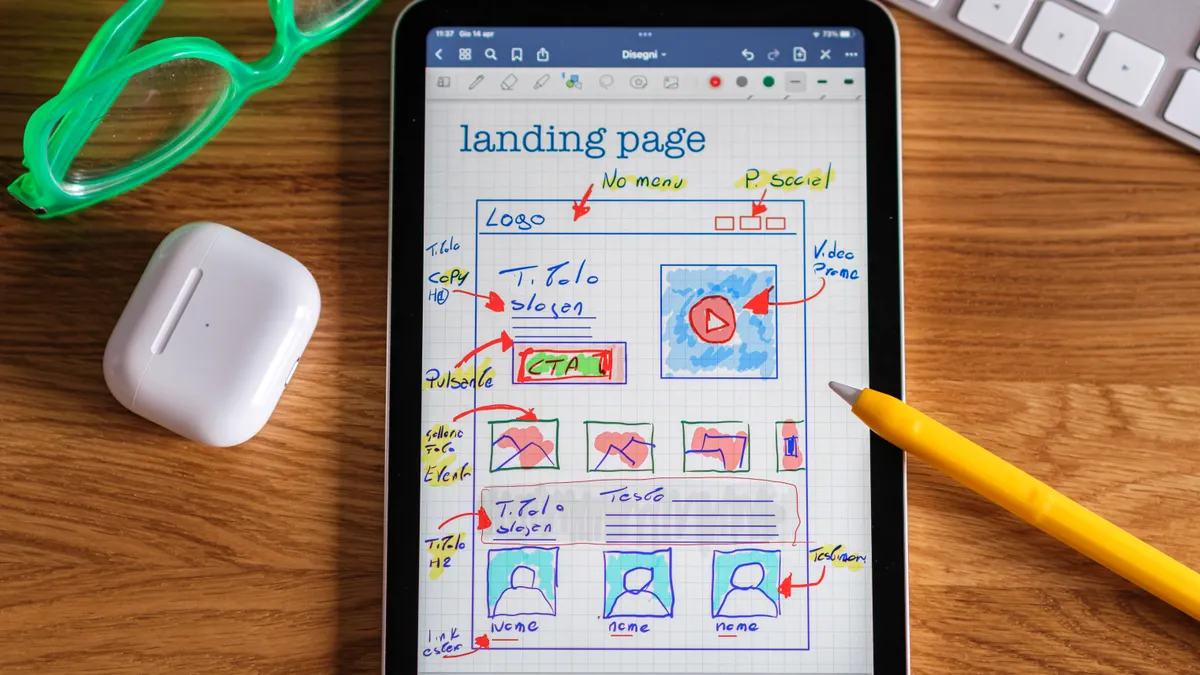
A service page has to make one clear promise, not three. The reader is usually asking a commercial question: “Can this business solve my problem, and should I contact them now?” That means the page should sell a specific service, not the company’s entire history, not a generic blog-style explainer, and not a homepage clone.
The template should support two outcomes at once: organic visibility and lead generation. For visibility, the page needs the service name in natural language, related terms in plain English, and enough topical depth to show relevance. For leads, it needs a strong offer, trust signals, and a clear call to action above the fold and again near the end. Google Search Central’s guidance on helpful content supports that emphasis on usefulness over keyword repetition.
A generic article gets this wrong by starting with brand fluff or by dumping features in no order. A service page should instead follow the buyer’s sequence: what the service is, who it is for, what it fixes, how the process works, what makes this provider credible, and what to do next. That structure matters more than clever phrasing.
The biggest mistake I see is writing a page that sounds informative but never commits. If the page cannot say whether the service is a fit for a small office, a multi-location company, a first-time buyer, or an urgent repair, the reader has to keep researching. That’s where conversions die.
SEO Article Template for a Service Page: the structure that works
This template works because it mirrors the way a real prospect reads a service page: scan, judge, compare, then act. I would use it for almost any local or B2B service page, from plumbing to accounting to managed IT, with the details swapped to fit the offer. In Google’s Search Quality Evaluator Guidelines, pages are judged on usefulness and the ability to satisfy intent, not on section count alone.
1) Hero section
Lead with the service name, the outcome, and the location or market if relevant. Keep it plain. A headline like “Commercial Roof Repair for Warehouses in Houston” tells both search engines and buyers what the page is about. Put one short supporting sentence underneath that explains the result in human terms.
2) Problem-and-solution summary
Name the pain point the service solves. A service page for tax preparation should say who gets stuck, what goes wrong, and what the service changes. This is where I’d include one or two terms people actually use, not a list of keywords.
3) Service details
Spell out what is included. This is where generic pages stay vague and lose the reader. If the service is HVAC maintenance, say whether it includes inspection, filter replacement, coil cleaning, emergency priority, or reporting. If the page does not define the scope, it invites confusion and bad leads.
4) Why choose this provider
This section earns trust. Show certifications, years in business, standards followed, service area, turnaround time ranges, or support hours if they are real and current. A prospect does not need a biography; they need evidence that the provider can handle the job.
5) Process
Walk through the next three to five steps. Readers want to know how booking works, what happens after inquiry, and what they need to prepare. This is often the difference between “I’ll call later” and “I’ll submit the form now.”
6) FAQs
Answer the objections that stop people from contacting you: pricing model, service area, timing, emergency availability, guarantees, or maintenance requirements. These questions often capture long-tail search traffic too.
7) Call to action
End with one direct action: call, request a quote, book a consult, or schedule an inspection. Do not bury the CTA under extra paragraphs.
For a service page, I would not treat every section as equally long, but a professional should tailor that balance to the offer and the audience. The process and scope sections usually deserve the most space because they answer the buyer’s practical questions. The hero and CTA should be short and sharp.
Where the template fails when people copy it badly

The template fails when writers mistake completeness for usefulness. A page can contain every standard section and still underperform if each section says the same thing in different words. The job is not to fill boxes; it is to remove hesitation.
I would avoid three common failures.
First, too much “about us” content. Readers searching for a service page are rarely looking for the company story unless it changes the buying decision. If the founder bio runs longer than the description of the actual service, the page is out of balance.
Second, keyword stuffing. A service page should sound like a professional explaining a service, not a spreadsheet trying to rank. Repeating “best,” “top,” or the service phrase in every paragraph usually makes the page weaker, not stronger.
Third, no proof. A claim like “high-quality service” means little unless the page shows what quality looks like: licenses, standards, response times, warranty terms, project photos, case types, or named service areas. If those details are absent, the reader has no reason to trust the pitch.
The other thing people miss is disqualification. A strong service page should say who it is not for. That can be as simple as “not ideal for one-off emergency calls,” “not for DIY troubleshooting,” or “not suited to large enterprise rollouts.” Honest limits improve trust because they make the offer feel real.
How I would write each section so it ranks and converts
I would write the page in this order: promise, proof, process, and action. That sequence respects both search intent and buyer intent.
Start with a headline that names the service and the result. If the business serves a city or region, include that naturally. Example pattern: “Payroll Services for Small Businesses in Denver” or “24-Hour Furnace Repair in Minneapolis.” Then support it with one sentence that explains the benefit in clear language.
Use the next section to answer the question “Why would I choose this instead of another provider?” This is where specificity matters. A phrase like “same-day dispatch” is stronger than “fast service” because it can be understood. A mention of “licensed technicians,” “ACA-compliant payroll handling,” or “OSHA-aware site procedures” carries more weight than broad adjectives, but if those claims are relevant or regulated, verify them with a qualified professional before publishing.
The service description should read like a scope document, not a brochure. Break the work into what is covered, what is optional, and what is excluded. That protects you from bad-fit leads and helps the reader self-qualify.
The CTA should match the service’s buying cycle. For urgent services, “Call now” makes sense. For high-consideration services, “Request a quote” or “Book a consultation” usually fits better. If the page is for a regulated or technical service, the CTA should promise a low-friction first step, not a hard sell.
A good template also includes one scannable proof block. That might be a short list of service standards, service area coverage, response windows, or credential categories. If the business has accreditation, licensing, or memberships that matter, this is where they belong.
The honest side-by-side: what belongs on the page and what does not
The page should include the details that change a buying decision, and skip the details that only decorate the page. Here is the simplest way to think about it.
| Criteria | Template priority | What to include | Winner for this condition |
|---|---|---|---|
| Service definition | High | Exactly what the service covers | Pages with a narrow, specific offer |
| Search intent match | High | Problem, solution, and location if relevant | Local and commercial searches |
| Trust proof | High | Licensing, standards, credentials, service area | High-consideration services |
| Process clarity | High | How booking and delivery work | Services with multiple steps |
| Objection handling | High | FAQs, timing, pricing model, exclusions | Readers comparing options |
| Brand story | Medium | Only the facts that build trust | Established providers with real differentiators |
| Keyword density | Low | Natural phrasing, not repetition | Almost never the deciding factor |
| Call to action | High | One primary next step | Every service page |
The winner in most cases is the page that explains the service better, not the page that says the service name more often. If the offer is regulated, expensive, technical, or urgent, the proof and process sections matter more than the design flourishes.
The best service-page template for local businesses
The best local-service template is the one that makes the service area and booking method impossible to miss. Local searchers care about whether you serve their city, how fast you can respond, and whether they can get a human on the phone. A page that hides that information under brand copy wastes a lead.
For a local business, I would keep the opening tight: service, city or region, and benefit. Then I’d follow with service scope, neighborhoods or coverage area, service hours, emergency availability if that is real, and a contact block. If the company serves multiple areas, the page should say so clearly without forcing the reader to hunt.
This template works especially well for home services, repair shops, clinics, and field-based B2B providers because the buying decision often depends on proximity and speed. A prospect in a rush does not want a manifesto. They want to know whether someone can come out, what the service includes, and how to book.
The weakness of this approach is that it can look thin if the business offers a complex service. If the sale requires technical explanation, contracts, or a longer decision cycle, a short local page may not be enough. In that case, the page should link out to deeper supporting content later, but the service page itself should still stay focused.
Exception scenarios where the verdict flips
The overall template changes when the service is highly technical, heavily regulated, or sold to multiple buyer roles. In those cases, the standard short-and-sharp structure is not enough on its own.
-
Enterprise B2B services: If the buyer is a department head, procurement lead, or operations manager, consult a qualified professional about the page’s depth and claims. The page needs more detail on integrations, compliance, onboarding, and implementation. A one-screen local template will feel too light.
-
Regulated services: Legal, financial, medical, and certain safety-related services need careful wording and a consultation-ready tone. The page should be precise, and any claims should stay within what can be verified. If the stakes are high, advise the reader to consult a qualified professional.
-
Multi-location brands: A parent service page often needs supporting location pages. One generic page cannot do all the ranking work if the business serves different regions with different proof points.
-
High-ticket services with long sales cycles: Remodeling, consulting, and custom manufacturing often need case types, process details, and objection handling that go beyond a standard template.
In each case, the template still matters, but the depth and supporting pages matter more.
Choose this template if the page has to rank and generate leads. Choose a lighter format if the service is simple, low-risk, and bought on impulse. Neither if the business cannot state the service clearly, prove competence, or explain what happens after the lead form is sent.
That verdict is simple because the decision is simple. If the service page has one job, make it easy to understand and easy to act on. If it tries to do five jobs, it usually does none of them well.
FAQ
What should be on the top of a service page?
The service name, the outcome, and the main call to action. If location matters, include it in the first screen so the reader knows instantly whether the page applies to them.
How long should a service page be?
Long enough to answer the real buying questions and no longer. For many services, that means a focused page with several short sections rather than one oversized block of text.
Should I put pricing on a service page?
Only if the pricing is stable and simple enough to state clearly. If pricing changes by scope, a quote-based CTA is usually better than publishing numbers that will age badly.
What makes a service page rank better?
Clear intent match, specific service scope, useful proof, and plain-language headings. Search engines reward pages that help a reader decide, not pages that repeat the same phrase over and over.
Should every service page have FAQs?
Yes, if the questions are real. FAQs help with objections, and they often catch long-tail searches that a standard paragraph misses.
Drafted with AI; not yet reviewed by a person.